
The contents of this article are solely my own work. You are welcome to share, reuse and incorporate it’s contents in other publications so long as due credit is provided.
Introduction
The purpose of this article is to demonstrate from the first step, the creation and deployment of a simple containerized Python flask app to the Kubernetes in a highly available design.
The project involves several steps but on a high level it can be summarized as below:

The code is written in python3 with the help of flask module.
See a live demo of the web app HERE.
The Python App
The purpose of the simple app is to show the CPU and Memory usage of the pod or the VM it is running on.

It uses the following x4 main Python libraries among many:
psutil==5.9.5
Flask==2.3.3
plotly==5.16.1
The app uses PSUTIL to get the cpu and memory metrics of the machine it is running on and spins up a flask web app in addition to plotly to show the cpu metrics in a presentable and graphical manner.
Back end app.py
The heart of the python app in the backed is the psutil module that allows us to extract the cpu and memory information on the running container or the vm. The code for the simple python app is available below. It includes details for each functionality.
The application will be running on port 5000 within the container.
import psutil
#import psutil module in full
from flask import Flask, render_template
#import the Flask class (used for creating web applications) from the flask module
#import the render_template class for styling

app = Flask(__name__)
#define a Flask app (create an instance of Flask class)

@app.route("/")
#define the location where the app will be running, here is the root
def index():     #define a function named index
    cpu_percent = psutil.cpu_percent()
    mem_percent = psutil.virtual_memory().percent
    Message = None
    if cpu_percent > 80 or mem_percent > 80:
        Message = "High CPU or Memory Utilisation detected, please scale up"
    return render_template("index.html", cpu_metric=cpu_percent, mem_metric=mem_percent, message=Message)

if __name__ == '__main__':
    #when  the __name__ variable is set to '__main__'.
    #This ensures that the script is being run as the main program
    app.run(host='0.0.0.0', port=5000)
     #set the host to '0.0.0.0' accessible from any IP address
The Front End
The main component of the front end responsible for drawing the guage is the plotly javascript code that is inserted in the middle of the html file.
Additionally the front end uses simple HTML, CSS and Javascript to visually stylize the app.
Bootstrap css and javascript libraries are used to further enhance the visuals of the simple app and to ensure the responsiveness of the web app front end.
Per best practice for Flask applications, static files should be placed in the static folder by default. the index.html file should also be saved in the templates folder.\
Therefore the contents of the application folder would be as follows:

Containerization
The app is containerized using the following docker file which utilizes the requirements.txt for importing all the modules while building the image.
#use the official python image as the base image
FROM python:3.10-slim-bookworm

#set the working directory inside the container
WORKDIR /app

#copy the requirements file into the working directpry
COPY /Monitoring_App/requirements.txt .

#install the required python packages
RUN pip3 install --no-cache-dir -r requirements.txt

#copy all the files in this folder to the working directory /app
COPY /Monitoring_App .

#set the environment variable for the flask app
ENV FLASK_RUN_HOST=0.0.0.0

#expose the port that the app runs on from the container
EXPOSE 5000

#start the flask app when the container is run
CMD ["flask", "run"]
The docker image is available from docker hub using amirarefi/my-flask-app:0.0.1.RELEASE
Kubernetes Infrastructure Design
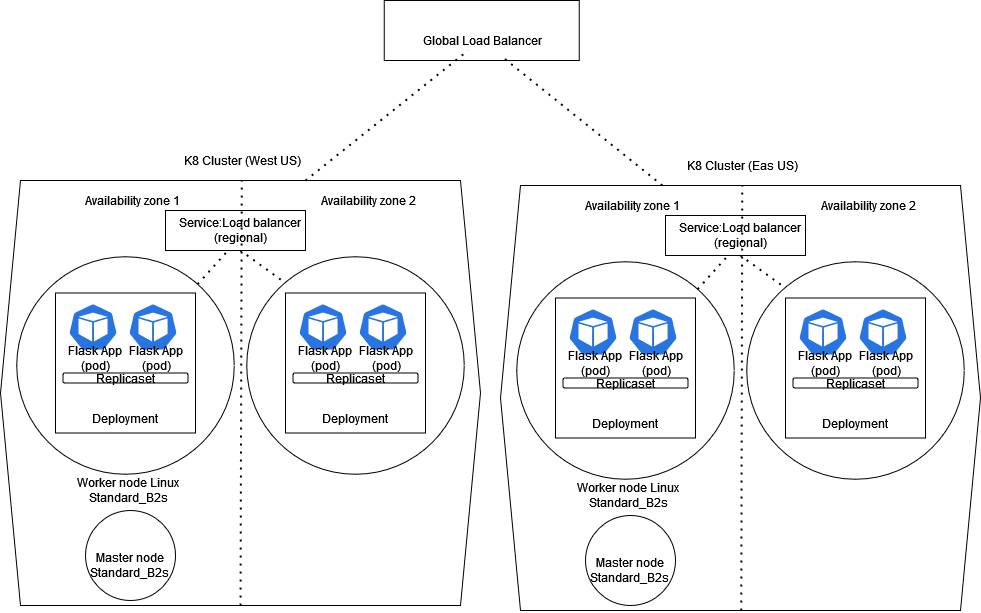
Following the containerization, the app image is deployed to the Kubernetes cluster with the following specs:
Number of regions: x2 to allow for regional redundancy
Availability zones: x2 in each region, for data center outage redundancy
Replicasets: x2 to have x2 pods running in each deployment
Global SKU load balancer distributes load between the two azure regions.
The overall design of the Kubernetes infrastructure is seen in diagram below:
The flask web app can be further automated by using terraform and CI/CD tool like Azure DevOps.This will be the next step of the project as soon as time allows.
As the application will be running on port 5000 within the container, it is important to open up this port in the Kubernetes deployment.yaml file:

Build Automation with Terraform
The cluster itself can be automated using terraform azure rm provider while the deployments within the cluster can be automated by importing the terraform Kubernetes provider.
In this personal project for demonstration purposes and simplification, only the cluster is created using terraform.
Below is the terraform Kubernetes code:
resource "azurerm_kubernetes_cluster" "Test_WebApp" {
  name                = "Test_WebApp"
  location            = "East US"
  resource_group_name = "Amir_Test"
  dns_prefix          = "testwebapp-dns"

  default_node_pool {
    name       = "linux"
    node_count = 1
    vm_size    = "Standard_B2s"
    os_sku     = "Ubuntu"
  }

  identity {
    type = "SystemAssigned"
  }

  tags = {
    Environment = "test"
  }

  local_account_disabled = false

  network_profile {
    network_plugin     = "kubenet"
    dns_service_ip     = "10.0.0.10"
    docker_bridge_cidr = "172.17.0.1/16"
    outbound_type      = "loadBalancer"
    pod_cidr           = "10.244.0.0/16"
    service_cidr       = "10.0.0.0/16"
    load_balancer_profile {
      managed_outbound_ip_count = 1
      idle_timeout_in_minutes   = 4
    }
  }
}
All files and code available on my GitHub page below:
 amirarefi.com
One response to “Create and Deploy a Simple Flask App to Azure Kubernetes Service”
[…] In one of the previous articles I discussed the creation and deployment of a simple containerized Python flask app to an AKS cluster. […]